OH yeah. the Delete [WP] button jumps out at me right away. Seems that, in general (task dependent of course) a vector from a given goal would be better, time or absolute distance. That’s what I’m going with anyway.
Hey, quick question (again), more of an opinion…
I’m using the built in Windows text-to-speech for custom radio stuff - no text at all. This is an extra step for sure (Gold Wave lets you do this pretty easily) but, well, just seems like a good idea.
So, any opinions on this vs just text and no audio?
NOTE: Scripting a “repeat all that nonsense please” radio item will be there of course since you’ll need to write stuff down in the cockpit.
I like both. I like the audio because it feels more authentic (and I have to struggle to listen, understand and remember) but the text might make it better for some - those who might have a hard time hearing it and those who might struggle to catch the voice in real time. At least if it is on the screen, if I miss something I have a few seconds to just back and re-read it 
text acting as subtitles is good for those hard of hearing.
3 Likes
Ah, good point. Hmm, making it Either/Or might complicate things. Have to ponder this. In the end doing both will take less work…
Key problem I usually have with any additional files like audio is they push the mission file size waaayyy up. Same’s true of briefing images, but since those are a tiny little picture relative to the screen size, you can get away with lots of compression and shrunk size.
I used my own voice for just a few lines for Osiris Theatre and that boosted the size to about 1MB.
When we measure our games in tens of gigabytes, what’s a megabyte more or less?
I’m using OGG of course and lowering the quality as much as I can get away with, yet still remain clear. Largest OGG so far is 81kb at 31 seconds. Most are about 20kb or less.
We’ll see. Keeps me off the streets at night.
EDIT: Shoot, it’s my UPload rate that pretty much defines how big I can make these.
You make my 56k modem cry.
Essentially yes.
Client loading times would therefore be dependent on your upload speed and mission size, so long as they have fast enough systems themselves. Although with typical server activity levels in DCS multiplayer, you likely won’t have to worry about multiple clients queuing for the mission files at the same time very often.
Where I live, residential internet is lucky to top out at about 10Mbps (~1.25MB/s) upload and that functions quite fine with a few users connecting at the same time with missions in the 1-3MB range.
That’s fast (glares at my ISP as I watch my D’load window for Syria Map). I’m at 1.3- 1.9 MB/s down, 0.8 up. Penalty I pay for living in a more rural area I guess.
Jumping into this late, however, my “radio voice” files are similar. Usually under 10 seconds and just a few Kb. I also cut much of the fidelity - Mono, low-is sample rate, etc. However, I do that to make it sound like it is coming over a radio. I also take it through a Graphic Equalizer knock out the highest and lowest frequencies and then add a bit of a static buzz/whine. I use an iMac app called Vector 3 for all my sound productions. I can (and have done) more with static and decreased hearability…can add in engine background sounds if the transmission is coming from a tank or APC…that type of stuff. Still, in the end the files are small.
Regarding using the advance WP actions for the Player/Client group. First, I would think tis only applies to the AI wingman/wingmen in the group, That said, in my experience, most of the things do not work if the Player is alive. The one semi-exception is the radio command Engage->Attack Mission Target and Rejoin (or RTB). I have had some luck with giving my wingman that command had have him actually attact a preset target (i.e. in Task: Ground Attack, and setting a WP Advanced Action to Bombing or Attack Map Object, the wingman will actually do it…sometimes with the correct release quantity.)
Other than that…not so much.
Although I haven’t tested it, I think perhaps the Wingman will starting acting per the Tasks, Enroute Tasks, Commands and Options if the Player flight lead it shot down. That would make sense. For example, if I add a Triggered Option to Switch Waypoint for some reason, I hope think that when the now leaderless Player’s group survivors got that order they would obey it.
A bit of an esoteric circumstance but if you think about it…just say you have several groups fighting the bad guys - SEAD, Strike, CAP… that your group is CAP over enemy territory. In the course of the engagement, you get shot down but are alive. Everything else goes well enough, the target is destroyed, and now it is time to egress. A trigger GROUP IS DEAD has activated for the destroyed target; an AI TASK PUSH that sends all the SEAD, Strike and CAP to a Waypoint out of enemy territory. Surely you would want the remainder of your group to RTB with the rest.
I use Gold Wave (GW, on Windows) and it does all that too; I create a source OGG from Text-To-Speech tool built into GW; then run a batch process in GW to do as you say (makes about 3-4 passes on each to get it sounding more radio-like, and reduces to mono). I’ve had GW for like, 25 years? Dev is great as I think I paid $15 back then and they just keep updating it.
Anywho…the advance WP action I was just trying to figure out what worked and what didn’t, and hopefully why.
I’m going for as simple as possible for these missions cuzz it just seems the time spent trying to get DCS to do anything even remotely ‘interesting’ is not worth the time trying to figure the edge case (it seems) that will allow the balancing act to, well, work. Without mods or anything anyway (both models and LUA lib’s).
My first useful mission has a Huey picking up troops, taking them somewhere and dropping them off while you get to ride shotgun on them. It worked. Til it didn’t. And I’ve no idea why. And I didn’t change anything beyond moving the waypoints around (kept everything close in both time and distance to debug at first).
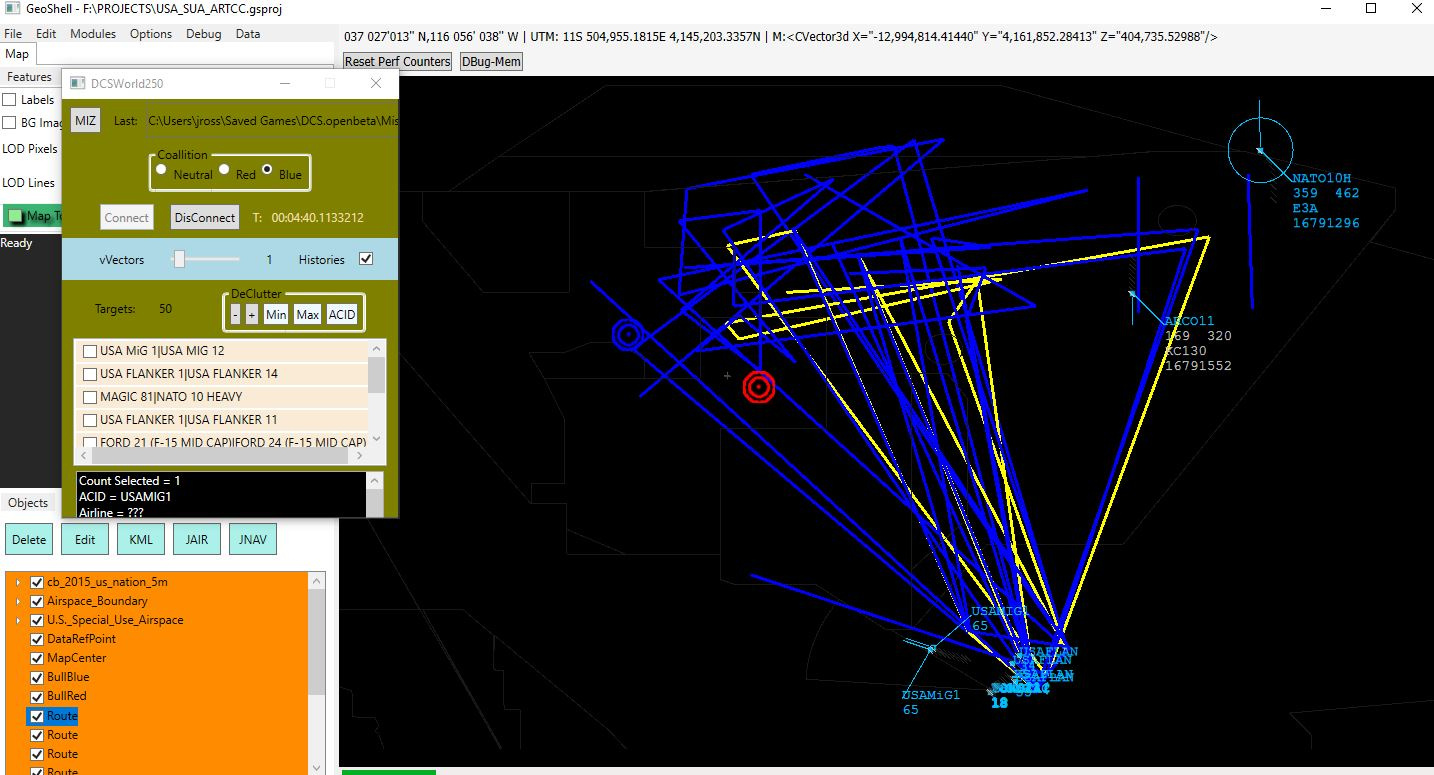
Then there’s the issues of re-usability. I’d love to easily take a mission and move it to another map but, well, ick. I’ve written a separate app that I’m thinking of dusting off to aid in this. Is a GUI app with map; loads a miz, etc. Currently it only lets you view the mission. Ugh, seems it might be handy to have it create what are, essentially, ‘templates’ at the mission level, with some randomization built in…then you just apply MissionCASSmall (for instance) to multiple maps.
Before I dive down that bunny hole I just have to decide if it’s worth the time to do it.
Here’s an old screen capture of a single frame of animation, from while the app was monitoring a mission from the NTTR (UDP connection), the data sources are from multiple different places (airspace borders, terrain, miz, etc).
3 Likes
Let me save you a trip. I have come to the conclusion that “less is more” in trying to make AI do what you want it to do. Sure, you can use the triggers to specifically direct a group to do what (you think) is exactly what you want it to do. For me that has not worked well. I have found that if I step back and use triggers / actions that are broader in scope, you often get an action that is nearer, if not exactly, what you wanted.
I’m hip. Testing a mission now that has (relatively) few triggers but seems somewhat realistic (for the situation). Some carefully (‘contrived’?) prompts (radio messages, text,briefing, etc) and a large dose of imagination and it’s working.
Mostly. I’d like to chain a bunch of these simple scenarios together and release them on a semi-regular basis here at MS. Maybe others can do likewise - it gets old knowing what is most likely to happen; some variety would be nice. Being ‘low-budget’ should keep the frame rate’s happy too.
Goal is to be able to keep the dev time to under a day, each. Hmm, need a name for this - dirt Mud-Simple Missions
— set a flag at a waypoint
— ‘Perform Command’, Run Script
trigger.action.setUserFlag(71007, 1)
===
– This script can be used to detect five digit flag values within Advanced Waypoint Actions:
— Stop Condition when a flag is true
if trigger.misc.getUserFlag(58104) == 1 then
return true
end
1 Like
Hmmm. That never works for me, HOWEVER, the API says the first param is a string.
– string, bool
trigger.action.setUserFlag(“flag number”, 1)
Didn’t occur to me to go against the docs. Bad on me…lets try this…
Works for AI but not for client.
Welcome to lua, where strings can be surrounded by double quotes, single quotes, or just no quotes. It works until it doesn’t!
Well, then for a Client, use an In Zone condition. That is when I use Mist, to specify an ac type or pilot name.
I would not expect a Client to always touch a waypoint.
The Stop Condition code above works well to stop an orbit.