Once monado is started and the headset is connected you should be able to see some of the outputs, like if its tracking is working and if it sees its controllers.
You can also test the headset. While monado is running, open a shell and type
→ xrgears
which is a simple demo that shows you floating pictures and some moving gears in 3D, the background seems to be some German railway station.
If your picture is wildly flopping around or not moving at all, check your monado screen and enable the advanced UI. It has a window called “SLAM tracker #1”. Check the setting “submit data to SLAM Tracker” is ticked, and click “Reset tracker state”.
There are tons of other windows in monado as well. Check them out. I found a cool visualization for my hand controllers position and also for the mercury hand tracking that I installed. And lots of settings for the headset itself. Post them here if you find cool/useful stuff.
And if you know a lightweight OpenXR software to test the controllers, please tell me!
Sadly it seems like my Rift S controllers can only do 3dof, so that won’t help much. But the buttons are working.
I tried to activate mercury for the positional tracking, but it seems that not OpenXR but the openXR->SteamVR bridge is the problem here, so switching to another way of tracking the position doesn’t do much good.
Talking about SteamVR:
Envision also builds a monado-steamvr driver that can be registered with SteamVR to translate the OpenXR commands into SteamVR.
That happens by either copying the driver into a Steam directory, or by using a shell script to point at it. I first used the recommended way of using the script. (You have to have SteamVR installed of course).
For me it looks like this:
→ /home/aginor/.local/share/Steam/steamapps/common/SteamVR/bin/vrpathreg.sh adddriver /home/aginor/.steam/bin64/steamvr-monado/
and you can remove it like this:
→ /home/aginor/.local/share/Steam/steamapps/common/SteamVR/bin/vrpathreg.sh removedriver /home/aginor/.steam/bin64/steamvr-monado/
If you just run the script without a parameter it should tell you if you have an “external driver” installed.
Now, the problem for me was: If I do that, then the driver won’t run properly.
As I can see in the log it cannot find its dependencies. I tried adding them to that location manually, but that’s just too many files. One would have to adjust the LDPATH but that is something that Steam has to do it seems.
Steam’s logs are here:
/home/aginor/.steam/steam/logs/
The most interesting ones in this case are vrmonitor.txt and vrserver.txt
Some applications (including some on Steam) don’t need SteamVR though. Leave it off and try some. Those who have OpenXR support should work in some way or another.
Strangely some work, some don’t.
I managed to fly around in aircar just fine using my Oculus touch controllers and Rift S. Sadly there is some distortion so I get pretty nauseous, but it works out of the box.
Sometimes nothing works, escpecially if you played around with settings and drivers and plugging in and out a lot. Then closing everything including Steam and/or rebooting has done the trick once or twice. Not sure what I had done there.
I also tried Moss Book II, and while I got the headset running with (and weirdly without) the launch option -hmd=openhmd the fact that my controllers only do 3dof means that I cannot use them here.
I also tried Keep Talking And Nobody Explodes, but it doesn’t recognize my VR headset at all.
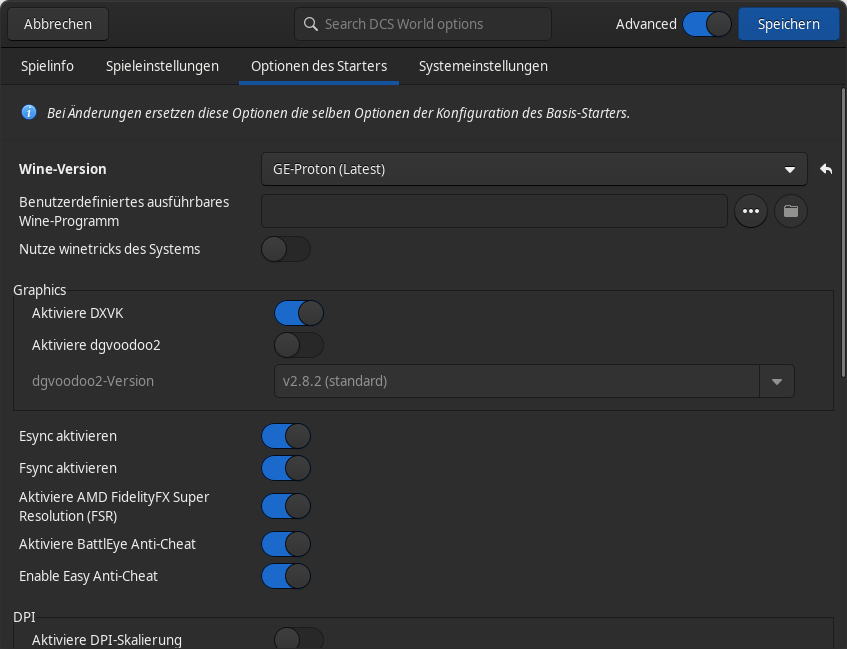
Neither does DCSW sadly. I have no clue why. Any help would be appreciated, I run DCSW via Lutris and it works fine, but VR just does nothing.
I tried disabling the launcher and setting --force_enable_VR and --force_OpenXR but still no joy. Not even an error message, it just starts up as if I had not set it to VR. Not sure if the sandbox-ish nature of Lutris/proton/wine is causing that or anything.
So yeah, that’s it for now. I’ll try a few more games, but it seems like I have to wait for the monado guys and/or Valve to improve the RiftS driver and improve the SteamVR integration respectively.
EDIT: Oh, and I played around with variables in Envision and building my own profile, but after a whole day of testing it turned out that the one that works best is the default WMR setting, for some bizarre reason.

 , thank you.