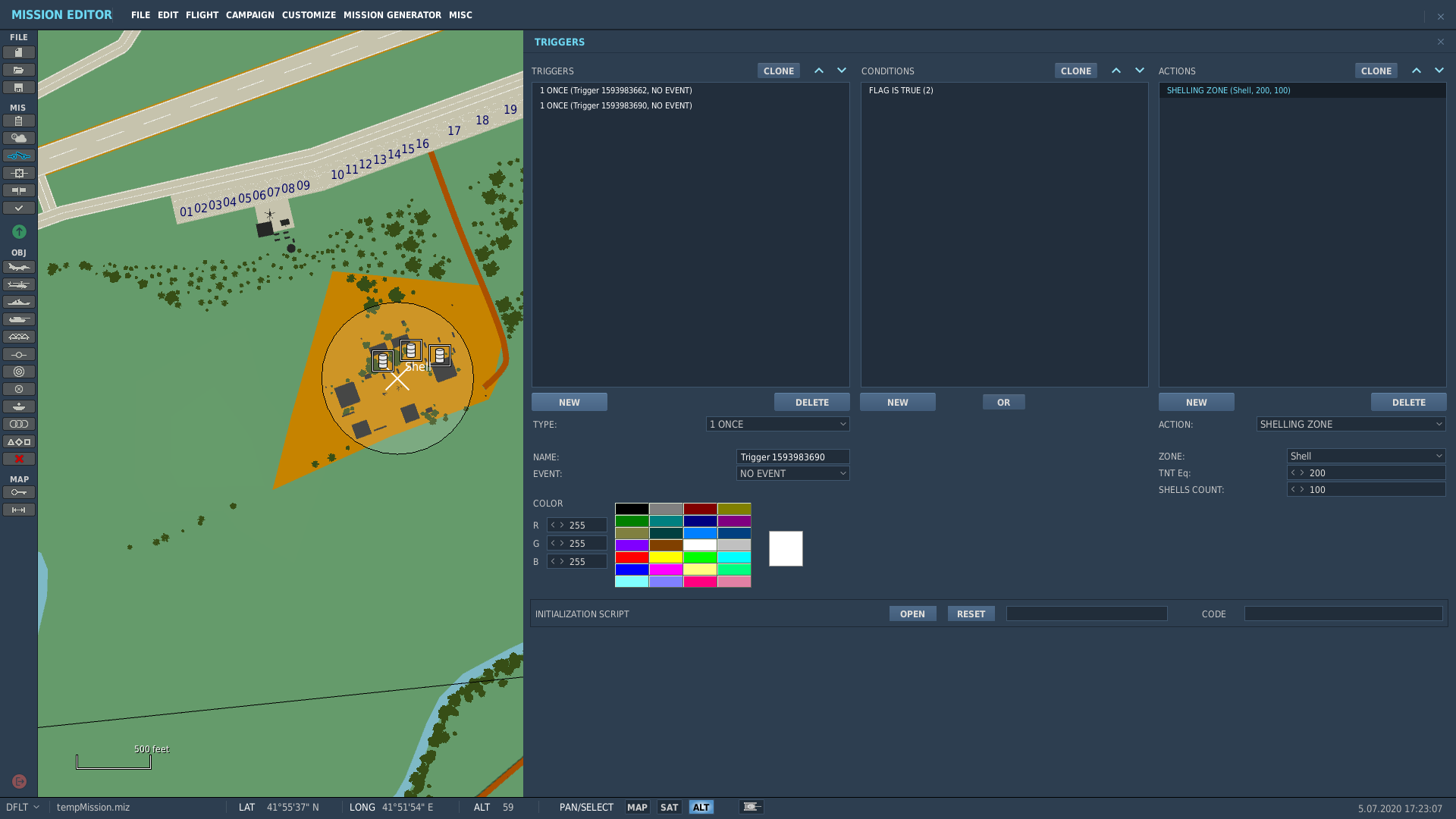
Kind of interesting the shells landed in a circular ring pattern, but none in the center. I would have expected a distribution with a bunch hitting the center target, then fewer hits the further you get from the center. Not sure if it was a probabilistic fluke or something in the code.
Ive used it before when I’m not near it. I find it to be too fast. I used it for a mission where by the time I got back to my base, the runway had bee shelled/bombed - requiring a divert.
This is a good feature for some applications. I gave one above. Also it provides some “atmosphere” without going through the trouble of setting up artillery.
For example: a mission where your base is being shelled–that 8 minute Mi-8 start by the checklist is not going to hack it! Yikes!
Actually, not so much yikes since it takes any artillery a few minutes to set up and start shelling. You will be halfway done the regular checklist before you see the first round impact. Where is the pressure in that?
But a shelling zone starts right away…a few time triggered shelling zones–maybe moving in towards you in your Hip until its right on top of you…that is pressure from the first seconds of the mission!
The variables, as seen on @weaponz248’s first screen shot, are TNT equivalent and Shell Count. That is workable, however I wish they also had a “barrage time” variable. The number of shells probably influences the total time the shelling lasts, however, I have found it to be pretty quick; much faster than a single battery would put out. It would be nice to set sorting like 60 shells over 120 seconds - if I did my math correctly, that is 1 boom every 2 seconds.
Completely agree, shell-rate would very much play in to the atmosphere of it and the video seemed way to quick - more like a hundred gun lineup with the order to fire given and the delay solely being human reaction timing, than a proper barrage by crews firing their weapons multiple times.
For reference, it takes an AI artillery battery about 3 minutes from task assignment to actually fire. Unit skill level also plays a factor here and a higher unit skill can shave a few seconds off that time.
For me, the challenge is trying to start a mission in the middle of an artillery barrage…as if you had just jumped out of a HUMVEE and need to do a Cold and Dark start with shells raining down on the airfield. As you indicate, with the enemy artillery battery starting at the same time, there is a 3 or so minute “grace period” before shells shot from that battery start to be fired.
However, since the shelling zone can start at mission start, I think it is a workable substitute. I would think that one can tinker with timer triggers and multiple shell zones that do not have many shells - 2-3? Spaced out right, in time and impact area, that might work…stop the shell zones at about the 3 minute mark when the “real” artillery starts. Might work.
One thing I’ve noticed about any kind of artillery (or more to the point, any kind of scripted randomizer) is the tendency to result in “squares” rather than “circles.” That is, in the real world we often see round impacts in a circular area, but in a computer environment with a randomization routine, we end up with a square area.
I’m sure there’s a reason for this and I’m also sure, as a lazy scripter myself, that there’s no reason to do otherwise because random numbers are random and that’s good enough. But I can also say that I definitely notice when a cratered moonscape is an almost perfect square instead of a circle.
I’m pretty sure nothing could be farther from the truth.
But I do get your point. …when I am developing a mission I lean towards that before the time artillery impacts get to an obvious “square” the player should have either silenced the arty battery or be hanging in a parachute. Of course that doesn’t always happen.
I’m not an experienced programmer (only done some stuff with Arduino and C), but it sounds like they’re just randomizing the X and Y position around the center point, which would result in a square. If they switched to a polar coordinate system, randomized the angle and had the radius on a normal/Gaussian distribution, it would probably work better. You’d likely need another step to convert from polar to Cartesian coordinates again, but I wouldn’t think it would be too computationally intensive.
Copy that…running through a couple more ways to do it in my head…maybe a corner…nope they all come out as a square unless, as you said, you do a polar coord system…gets messy translating back into an x,y grid
What I did yesterday was to set up a couple of Paladin batteries which start out firing at a couple of Fire at Point areas. I ran the sim until they started firing, stopped it and noted the shot and splash times from the debrief. I then set 3 Zones for the Shelling Zones trigger action. Next, 4 “Early Shot” timed triggers spaced out ~30 sec apart with a few (no more than 5) shots per zone; “randomized” a bit which zones were used each triggered action (1, 2, 1&2, 1&3, etc.) and number of shots used (the more zones used, the less shots in each). I timed it out so that the Shelling Zones ended about less than a minute from the first Paladin splashes.
It gives the impression that the garage has been going on since the start - and continues semi-seamlessly into the “actual” artillery shots.
The limited number of “shots” using the Shelling Zones means that the dispersion is not recognizable as a square. Fun stuff.
In some cases especially in MP we get some odd artillery results. Near max range barrages end up making near perfect lines, like a creeping barrage that can’t decide which way it is creeping.
I recall cross-shelling a runway once, with batteries firing perpendicular and parallel to the runway heading which if placed more carefully, could have drawn a tic-tac-toe board in no short order.
I have noticed that wind effects the accuracy of the long range Uragan MRLS salvos - you have to add a bit of “Kentucky Windage” to get it to hit the area you want…not sure if artillery shells are so effected.
I noted that with the US MRLS as well, my rockets were going long the other day. I don’t think artillery is as affected though, the rockets travel farther up into potentially stronger winds.
Not too tricky in all honesty:
x = r * cos(theta)
y = r * sin(theta)
Only two lines of code, and only a tiny bit of trigonometry!
Now there’s an idea, artillery Tic-Tac-Toe!
Colonel: “Sergeant, adjust artillery and put a cross in sector A1.”
Sergeant: “But sir, we’ve already destroyed the airbase.”
Colonel: “I don’t care soldier! I’m going to beat the other Colonel if it’s the last thing I do!”
Sergeant: “In that case sir, I’d suggest sector B2…”
Colonel: “Good call Sergeant. Fire!”
Is there a way to make tanks or other vehicles drive in reverse? In Syria, I wanted some tanks crest over a hill, take a shot and then reverse backwards to safety. If I use waypoints the tanks circle around showing their weak armor no matter how close I make their waypoints.

 Of course that doesn’t always happen.