Unless something is weird (anything’s possible) should work fine. In fact I swap between the 2 versions daily: create the mission in 2.7 (for reasons that would take too long to explain), copy over to another PC and run it in 2.8. Just 1 mission feature I have to fill in so far (helicopter recovery tanker thing).
Glad you find OpenXR useful. I was happily using OpenXR and OpenComposite before the recent update that supports OpenXR natively. It was an interesting 48 hours with the patch and so on but nevertheless I think it is a big move in the right direction.
I’m now trying to work out if just the command line of …DCS.exe --force_enable_VR --force_OpenXR is sufficient on its own. It seems to work well but I can’t see how to call up the OpenXR menu anymore. Ctrl F2 used to do it. Perhaps it is no longer necessary and ED have somehow baked in the settings that used to be available from that menu.
I think the OpenXR Toolkit menu should work with just DCS.exe --force_enable_VR --force_OpenXR. And it is needed for many settings and tweaks. Maybe try reinstalling the Toolkit?
Thanks, that’s really great news - now I’ll update cos apart from the complaints about performance I was reading, my main reason for staying on 2.7 was this.
From the “Another Reason I keep My Flight Sim PC Pristine” department:
This [new channel to me] YT video touches on it:
Discord and if you follow the links OBS Studio may hurt your nVidia GPU performance.
Short version: as far as I can tell both the above allegedly ‘down clock’ your GPU when they are running. I say allegedly cus I don’t use either on the “play” box so can’t speak from experience.
I find this all very interesting. So I decided to use open xr (Reverb G2) I have deleted steam vr. Now looking for the next stage. Help would be greatly appreciated by a total ignormus with computers. I got lost as soon as I read Hololens 2 emulator
Awesome. I would love to help by writing up a detailed post outlining steps A-B-C, but I’m away from my PC this week, at least one hotfix behind, and would hate to miss something and mess things up.
Scoop, if you have the Reverb G2, I think you’ll really like OpenXR. On mine, with Motion Reprojection forced on, it seems much much smoother in the cockpit. Without MR, or in SteamVR, when I move my head the text in the cockpit seems to stutter a bit. With OpenXR it’s like butter!
In OpenXR Tools set the WMR runtime to OpenXR - Microsoft Apps
In Windows Settings, (Mixed Reality, then Startup & Desktop) ensure the option to automatically start SteamVR is off. There shouldn’t be any need to delete SteamVR.
I didn’t install Open Composite because there is already a ‘openvr_api.dll’ in my DCS/bin folder.
Add ’ --force_enable_vr --force_OpenXR’ to the DCS.exe shortcut (I created a new one on my desktop just to be sure.
I also read at least one article that suggested making sure it was all working OK before installing OpenXR Toolkit. That will be my next step.
Thanks for the help and the tips everybody! @Scoop and I just set up OpenXR on his machine and it went flawlessly.
We did not go with OpenXR Toolkit yet, but we will switch to that if there are problems going forward.
For now we just did:
Install Windows OpenXR Tools from Microsoft Store (with SteamVR removed, there was no need or option to set it as default runtime)
Create a DCS shortcut with --force_enable_vr --force_OpenXR added to the ‘target’ box after the DCS.exe path
Had a nice test flight in the Huey on Aerobatics Europe Marianas after that. Being the Peter Pilot I am in the Huey, I left one of the skids on a palm tree, but did land in formation at the end. Scoop is a smooth lead pilot and a great instructor.
I updated yesterday - now my DCS World installation has stretched to 326GB! Without mods. That’s a little bigger than FS2020 (at 257GB). It’s a good job I recently replaced my 500GB SSDs with 1TB sized ones.
Now for the real test - VR performance. Have to say, my VR performance in the last 2.7 stable version was the best it’s ever been in v2, so here’s hoping.
oh, forgot - can someone please remind me which folder contents need deleting to replace the shaders?
Seem to remember fxo being one of them. Actually, I rename my ‘old’ config folder on every big update, so that bit is taken care of already. I also have no idea at all about this SRS integration thing. I got all the bits together (I think) but never got round to it.
later: Okay, one short flight around Cyprus in the F-5E and I can relax! Used the CG multiplayer mission and flew at 800-1400ft and 350KIAS over towns and trees (which look way better than those horrid things in the Caucasus map) and using my Index it was very smooth - but the odd micro-stutter, nothing to worry too much about and barely noticable I had flat shadows on which I see causes problems in 2.8, so will change that.
fpsVR showed an average framerate of just under 60fps with my Index set to 120Hz refresh rate. The graphics graph was mostly green on the ground, with orange bits when airborne - the CPU graph was always well into the orange sector - but at least that isn’t red!
You can see the micro-stutter bits in the cpu graph, with the regular red lines:
is this a thing in DCS, or is it placebo or some custom scripting?
or pure
Repositioned and ready to engage the BTR, I was this time able to spot it, however, it was far too close for a Vikhr anti-tank missile shot so I switched immediately to the 2A42 30 mm cannon. Three bursts into the APC and it was on fire. However, crew from the APC disembarked and began firing at me so I dove for the ground and made a tight turn back into the target zone firing a barrage of rockets.
@Freak did a fast and efficient install of open xr - dictating in easy stages for a person with little brain and no computerspeak. He clearly knew exactly what he was doing and why.
The result was noticble as soon as I started dcs. The loading bar has always been shown two or three times slightly offset from each other. This has now gone. Likewise no stutter at all during the load. No need to close your eyes during the load. Load speed is much faster.
The airfield fence shimmers, but overall it was a vast improvement looking out at the world. Using the Marianas map the display was smooth*. FPS was 50/60 whereas I would have expected 30/40fps before. Getting into a stable hover then flight reduced the fps by about 5. Looking at @Freak in his Huey didnt have any effect on fps. Tonight might be a big training session on Low Level Heaven so ten or so Hueys in formation, firing gatlings will test my system.
I look forward to reading about the effects of using the tool kit. Most of all thanks to everyone for their advice and @Freak for his time and advanced knowledge.
I am fairly regular on Rotorheads and I’ve never seen that. I’ve been similarly shot at by a separate group while engaging a technical. But… I usually fly the Mi24 so I didn’t have eyes one what might have been really happening. Would be nifty.

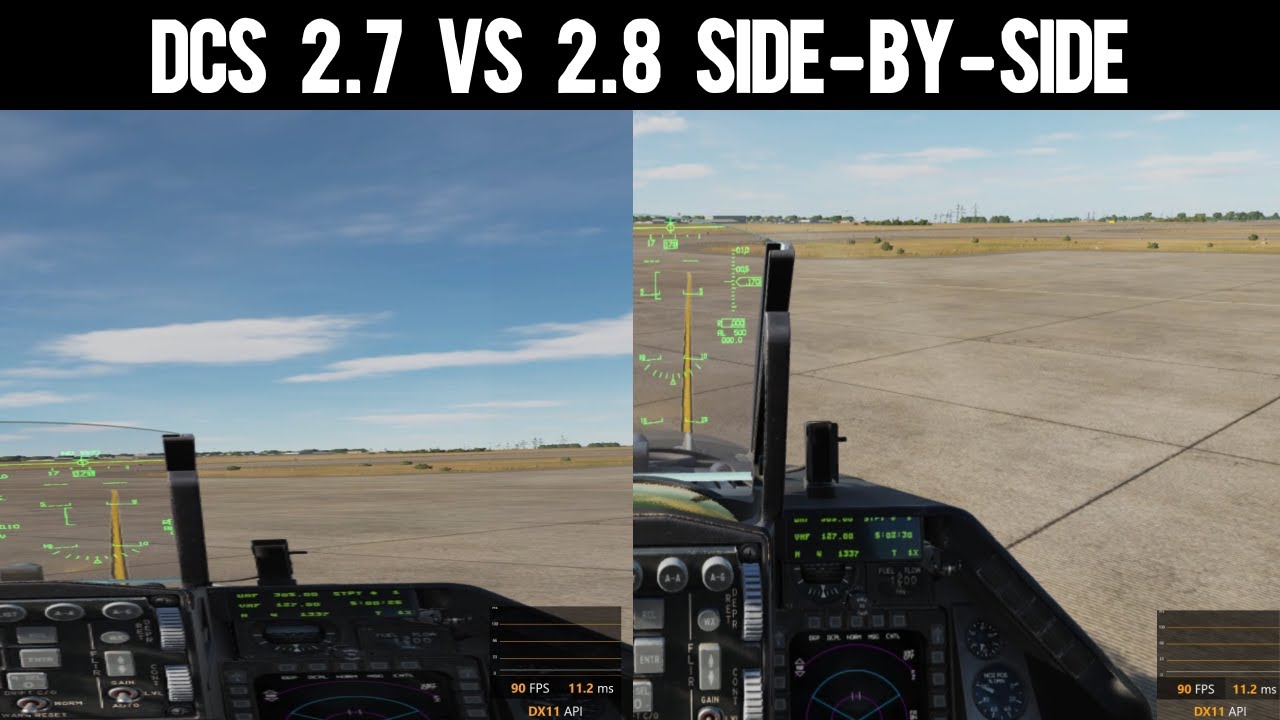
 )
) I had flat shadows on which I see causes problems in 2.8, so will change that.