The last few years I’ve been using the EASY COMMS option (or whatever it is called)…just hitting the backslash key brings up whatever radio. I was on a MP server the other day though…and I’m pretty sure I was receiving every single communication from every entity on the map (AWACS, control towers, tankers, etc…) …it was basically a non-stop litany of communications.
So…I’m guessing I need to go back to hard (realistic) comms such that only a tuned and active radio/frequency will only allow me to hear that.
I have to admit…I’m totally out of the loop now on SRS and all that. Does SRS automatically know what avionics are tuned in the helicopter/aircraft and work accordingly? I can dive into some YouTube videos I guess…but just was wondering if most of you here are using the realistic comms option?
So, you would only need SRS to be talking to other players on the server. For talking to AI’s, find the relevant button in the controls and map it to bring up the radio menu. Something like
Transmit Switch - UHF (Call Radio Menu) or Transmit Switch - VHF (Call Radio Menu)
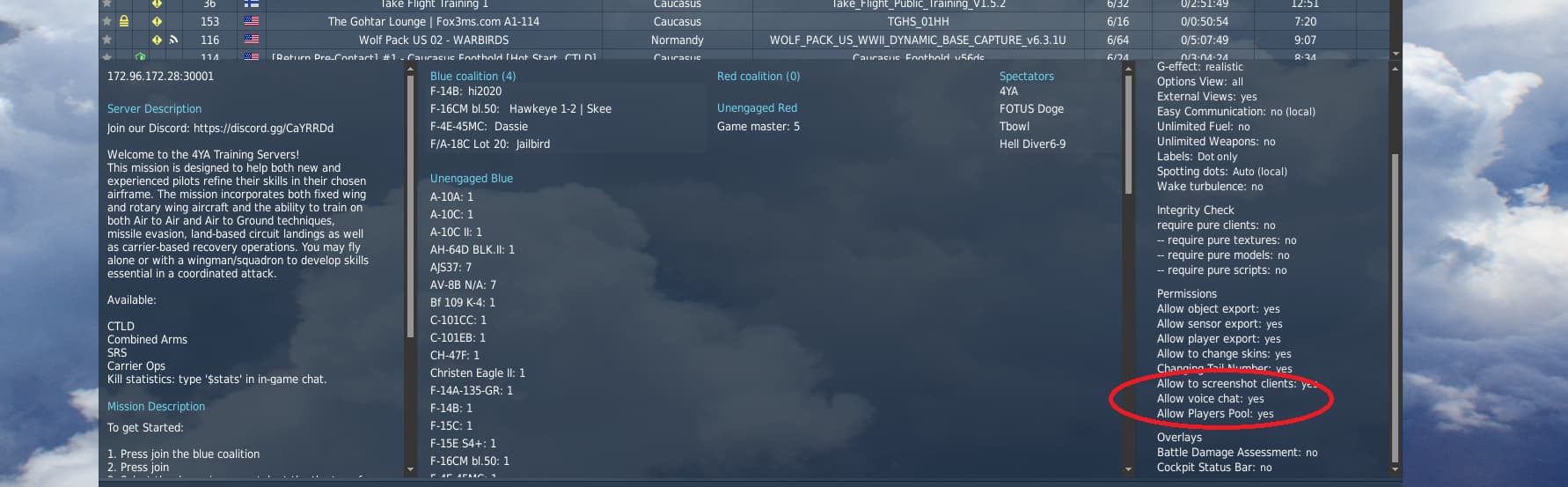
can bring up the trusty radio menu but with a specific radio assigned. You get more control who you talk to but there is of course a chance of hearing only crickets reply back if something went wrong along the way which is unlikely with easy comms enabled. Note that DCS now also natively supports VOIP using the radios similar to how SRS does it. So having the radio set up correctly can have you talking to other players. You should check if the server has Voice enabled:
To talk to people on your freq. Hope this helps! I do personally fly with realistic comms and find it enjoyable, although it can be painful if the mission designer did not think about programming channels or at least briefing frequencies other than the default ATC freq you always get at the bottom.
Yes that was the big point of SRS. It works based on how your avionics are set and also introduce some realistic limitations to them (short ranged radios can’t hear each other over long distances, signal occlusion is possible, etc.).
SRS is a major part of the fun of multiplayer. Also, it has an overlay in VR so you know who’s talking. It isn’t easy to set up to your full satisfaction right away. But once you do you will look back unfondly to those ugly old days of Teamspeak and Discord.
The way I use SRS may be a bit different but it works well. I have two buttons that I use for DCS “internal” comms only (not SRS). I have four separate buttons that are exclusively used for SRS (shifted bands on a mini-stick rather than buttons actually). The four are mic pushbuttons for UHF, VHF, FM and intercom.
I’ll explore that a bit today and see what I can see. My worst fear is being on a wrong frequency and having everyone else yelling (to no avail) “BeachAV8R…you are hitting friendlies…stop…for the love of god stop…!!!”
It’s happened to me on Rotorheads a couple of times. I was kicked for it once. Just before the kick the SRS screaming was…ample. The problem (then) was that circles of friendly troops and enemy troops would often be intertwined like the Olympic logo, yet not fighting or moving. You just had to know.
The reason most servers and pretty much every squadron uses SRS is because DCS VOIP has some limitations that make it useless in certain scenarios.
For example if you want to use LotATC to provide AWACS support and/or ATC on your server you immediately run into the problem that you can’t run DCS and LotATC at the same time because doing so will crash DCS. Since DCS VOIP can’t run independently of DCS it’s immediately disqualified for use. sRS also provides much more advanced features like being able to manually set up IFF if your module doesn’t simulate the system so LotATC can still read your squawk code
Or, if you want to prohibit everyone from talking to each other all the time you can’t disable the global chat last time I checked, so people can just talk to each other all the time no matter what.
SRS is pretty simple to setup and use as it will automatically connect to the server and you simply use the radios in your aircraft to tune frequencies, squawk codes etc
Not to (sure) cloud the discussion further, but VAICOM is a free plugin for VoiceAttack. It allows you to communicate with DCS ATC and Jester via voice instead of the comms menu. Such as, “Flight, engage bandits” or “Approaching for refuel” and my favorites, “Ready pre-contact” and “Two, cover me”. It also allows you to control your aircraft via voice, but I don’t use it that way. VAICOM integrates perfectly with SRS and they can operate simultaneously.