It’s really easy, install Steam on Linux, then navigate to the game in your library then Properties->Compatibility and check Force the use of a specific Steam Play compatibility tool. You can then check ProtonDB which Proton version works best and customize that from the drop-down menu. Usually the default works fine though.
If you have games on GOG or obtained them some other way besides Steam, Lutris works fine as a Wine/Proton launcher.
Oh, completely slipped my mind to mention: changing the shell is trivial and can be done per user. Just install the shell you want (for CachyOS it’d be “pacman -S bash” for example, but bash is already included with that OS), “chsh -s /bin/bash”, reboot and opening Konsole gives you bash instead of fish (or if you ssh into the PC you’ll get bash instead of fish there too).
As someone who is just beginning their Linux journey due to the ‘death’ of Win10, every bit helps and this particularly (I have a stand alone version of DCS and Reverb G2) is greatly appreciated.
Well I looked at the DCS thread on this and it looks like alot of work to get it working.. I had tried it myself with a Disto and could not get it working..’
The Thing I find wrong with Linux is how much change there is from trying to do a simple procedure. for example I tried installing VR now I Googled how to do it and found mostly older posts on how to do it that did not work or anything..
In Windows I run an EXE and most times it will install said program and work.. I did not have a similar experience with Linux. I am still not sold on Linux.. I like the idea and all but not a big fan of what Windows does with all there telemetry and such.
but at least I dont have to Google endless and fruitless searches on how to install or setup a simple program to run my devices..
To get my G2 working in Windows I run Oasis on steam and I can install steam in a few easy clicks of the mosue and prompts but for Linux oh sudo this and install the librarys of this akkk still not very user friendly.
EDIT: I was looking at Lutris that again looks interesting maybe more refined to work with a gaming setup. but I imagine still quirky. I may look at some videos for the distro thnx..
Completely understandable. I think it’s fair to say that a substantial amount of Linux users are also tinkerers for who Linux is not only an OS to run their stuff on, but also a hobby.
Every user has to weigh their priorities, do i want to have things working more easily but be annoyed by apps and everything else that comes out of corporate greed, or do they want the feeling of being in charge of their computer again but needing to know more to do so. For me the latter one was more important and having to tinker more actually makes it even more rewarding once I finally get there. And the community makes it easier to tinker because I don’t feel like information is held back from me.
But let me tell you, as someone who first got into Linux with, well, kernel 2.0.33, Linux has come a loooooooooooooooooooooooooooong (ran out of o’s ) way in terms of usability and esp gaming. And the problem is always the same, no matter if Linux or electric/hydrogen car infrastructure: there needs to be infrastructure to fuel demand but w/o demand no one will build infrastructure. Remember, Linux must jump thru a lot of hoops to make programs work that were not intended by the developer to run under Linux, with drivers which are in part made by enthusiasts, reverse engineered, w/o support from the manufacturer.
As a calm, settled person who was always skeptical about Big Tech I see using Linux as a step towards more freedom w/o needing to throw rocks at police officers
Both DCS and VR under Linux are currently fiddly and difficult.
The combination even more so.
Not so long ago, playing any recent Windows game under Linux was the same.
Now, most Windows games “just work” in Steam or Lutris on any Linux installation, all thanks to what Valve has done for the Steam Deck.
I have good hopes that the Steam Frame will do the same for VR in Linux.
And that DCS’ Vulkan implementation will put DCS into the “most games” category for Linux compatibility. From the “2026 roadmap” newsletter:
Moving to the Vulkan API will also allow DCS to operate on more than just Windows PCs.
I’m willing to bet that this stuff is a lot simpler at the end of the year.
Well setting up for Proton and running a game regular wise was fine. but with my G2 it was not so easy with Linux. I don’t mind tinkering but if there was information that would work I would not mind.
Most times I would do something and then later find out I should not have did that with said distro was a little frustrating.. I am sure as time progresses it will get even easier but for now since I just tried it a month or two ago and amd not lookning to do that again for some time..
I wouldnt mind trying it but only if there is a sure fire way of getting it done.. not endless searches on how to get it working.. like I say in WSindows I usually run said EXE and then the program just works no fiddling with sudo commands and downloading said packs or whatnot..
Let me preface this with: in the current state of DCS, I DO NOT RECOMMEND running it on a Linux desktop. Especially not in VR.
If you are very stubborn and/or clever though, here’s what helped me un-**** my install this weekend.
I moved away from using Steam, fully to Lutris, using this guide.
I’m using the Reverb with Envision/Monado, and Mandle420 points out the option that I missed in Envision to copy the required env vars. That helped!
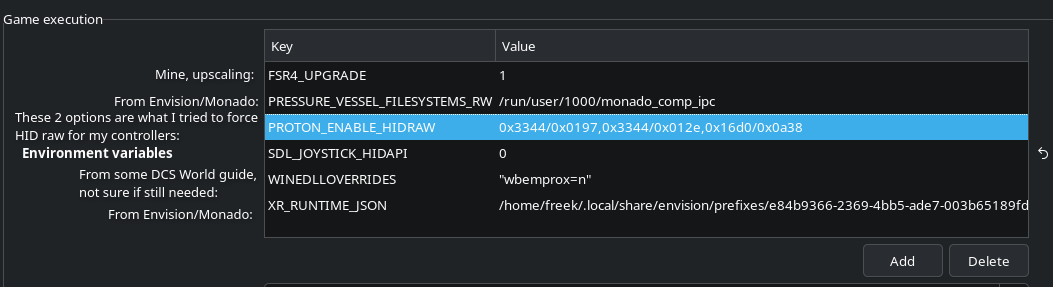
Only problem I have left is that I can’t use most of the buttons on my Virpil Throttle. I’ve tried to force Proton to use HID raw instead of SDL but it’s not making a difference. The buttons are registering in evtest, so my Linux machine is seeing them, but in the Proton translation to DCS, they somehow get lost.
Here are my annotated env vars set in Lutris: the weird numbers and letters in PROTON_ENABLE_HIDRAW are the vendor and product ids (prefixed with 0x), you can get them from lsusb, where they are listed as ID VVVV:PPPP, where VVVV is the vendor ID and PPPP the product ID.
Is it actually the emulation layer that is screwing with the peripherals? Bacause if not, then running natively won’t change squat abour the status quo.
I’ve been thinking about trying to get TrackIR & my hotas working, but this doesn’t sound encouraging. Apart from HID, DCS did run quite well on my system, last i tried (don’t have a VR setup though).
I actually passed my ReverbG2 down to my son to use on his rig for iRacing and even with only 6GB RTX2060 he’s able to run it decently. He’s trying to save money for a house so it’ll have to do for now.
I’ve got a XT6650 that I just dropped into an old i5-6600 setup to build a Linux based gaming rig to test out.
Thanks, I had completely missed that! I’ll have a go at getting Oasis and DCS installed in a fresh Windows 11 over the lunch break
(Lunch break was re-assigned to deconstruction of a bed, for which a buyer suddenly showed up. DCS is installed though, neatly spread across 2 tiny SATA 256GB SSDs I had not given to Linux yet. Now I just have to test VR performance with Oasis when I have an hour available, to see if this is worth reformatting the big NVMe again)
Good luck. The most common issue people have is that the Bluetooth receiver in the headset isn’t activated as yet (upcoming Oasis release hopefully, HP made that bit hard) so if you want hand controllers active then you’ll need either your motherboard or a BT dongle enabled. A few people with motherboard BT and using no antenna (it’s usually the same one used for onboard wifi) report bad tracking. The hand controllers need an ok signal strength. I guess because people’s heads usually aren’t that far from their hands

 ) way in terms of usability and esp gaming. And the problem is always the same, no matter if Linux or electric/hydrogen car infrastructure: there needs to be infrastructure to fuel demand but w/o demand no one will build infrastructure. Remember, Linux must jump thru a lot of hoops to make programs work that were not intended by the developer to run under Linux, with drivers which are in part made by enthusiasts, reverse engineered, w/o support from the manufacturer.