I have my tm fa18 grip attached to ab9 with a virpil 20mm extension, no issue.
1 Like
That or your local time on the PC is wrong
3 Likes
Or a false positive by the antivirus thinger on the mod files. Put an exception in it for the DCS and saved game folders.
3 Likes
Talk on the ED Forums says it’s caused by an update to Windows Defender. You have to add DCS to your excluded folders, then uninstall/reinstall the affected modules to replace the .dlls that Defender deleted.
3 Likes
^^^
Yes, that did it for me. It just popped up the other day, only on the F-14.
2 Likes
Thank you @schurem and @Clutch:
Of course it was Defender! Good call guys.
I was able to go into Defender and restore me files. I then created an exemption for the DCS folder. My Tomcat and Mudhen modules still work, so i got lucky. To retore them i went to Win security/ Virus and threat protection/ Protection history. I looked at the files and restored them. Sure enough, they were all DCS files. All is well again.
Thank You!!!
3 Likes
Yes, DCS was flagged as a malware because it eat all your money, free time and disk space….
12 Likes
That should go in the hat for “Best comment of the Year” award! So far.
6 Likes
I feel this is pretty relevant.
3 Likes
great to see that it’s back! I should really bring my Hind and MiGs here some day..
1 Like
We should visit the server as a group 
5 Likes
Dojo storm! Duck yeah!
3 Likes
Just used the Cold war Germany map for the first time. Experiencing massive stutters around Spangdahlem and Bitburg. But only on taxi and take off and then again on final approach. Playing on 2D. All other maps work without stutters. Wondering which setting I can lower with out compromising graphics to much
1 Like
Since the last two updates I have noticed that the map is now a massive memory hog in VR. I regularly see in excess of 60GB usage (I have 96GB). A few weeks ago a buddy of mine ran out of memory and his game crashed but after he restarted the PC it was fine again (64GB). Maybe try playing around with the sliders to see if that helps. A last resort would be to try and lower terrain textures
4 Likes
Have you guys tried deleting the metacache for the map?
2 Likes
just looked at that file… I have not heard about doing this, the standard metashaders and FXO files, but not anything in the actual map files
1 Like
It’s been a while since I did it myself, but it used to be a suggestion when experiencing sudden performance issues with certain maps…
2 Likes
??? Where be this
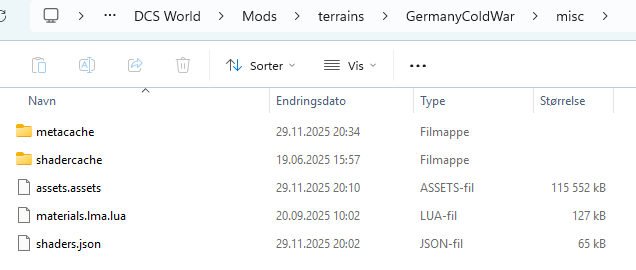
Cool. Never knew about this one.
1 Like