Damnit… this does not bode well for my bank account. lol
Currently sitting on a R7-5800XT, 64 GB DDR4, and a 4070 Ti Super for my Quest3
Damnit… this does not bode well for my bank account. lol
Currently sitting on a R7-5800XT, 64 GB DDR4, and a 4070 Ti Super for my Quest3
I used to have an 5800XT with a GPU less capable than yours (RX 6800XT), and switching over to an 7800X3D made a huge difference. In retrospect, that system was definitely choked by the CPU.
So try a new CPU, especially any X3D model, and keep the GPU.
I’ll run some tests with the same setup you are using in DCS and report back numbers. I’ve been a bit busy since delivery of my new PC and haven’t really had a chance to wring it out. I did load DCS and X-Plane a couple times and..in 2D..the FPS are amazing compared to that decently performing 2080Ti.
Does this work? By that I mean..is that something I should use? 
Problem there is that requires a move to AM5, so new MB and RAM to support that CPU.
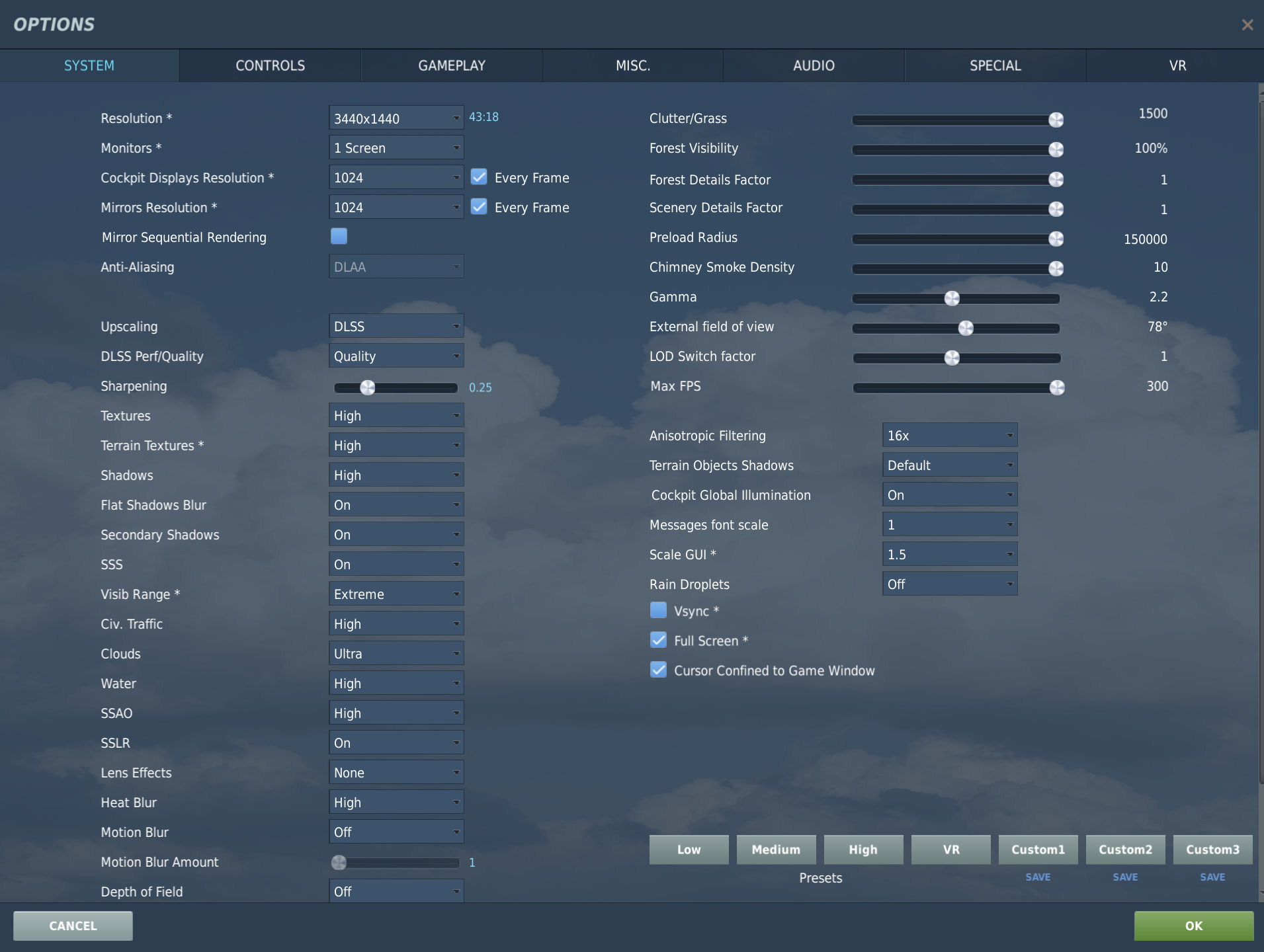
OK…ran some quick and dirty tests. Same config as yours:
My rig is Intel Core Ultra 9 285K 3.7GHz / RTX 5080 / 64GB DDR5
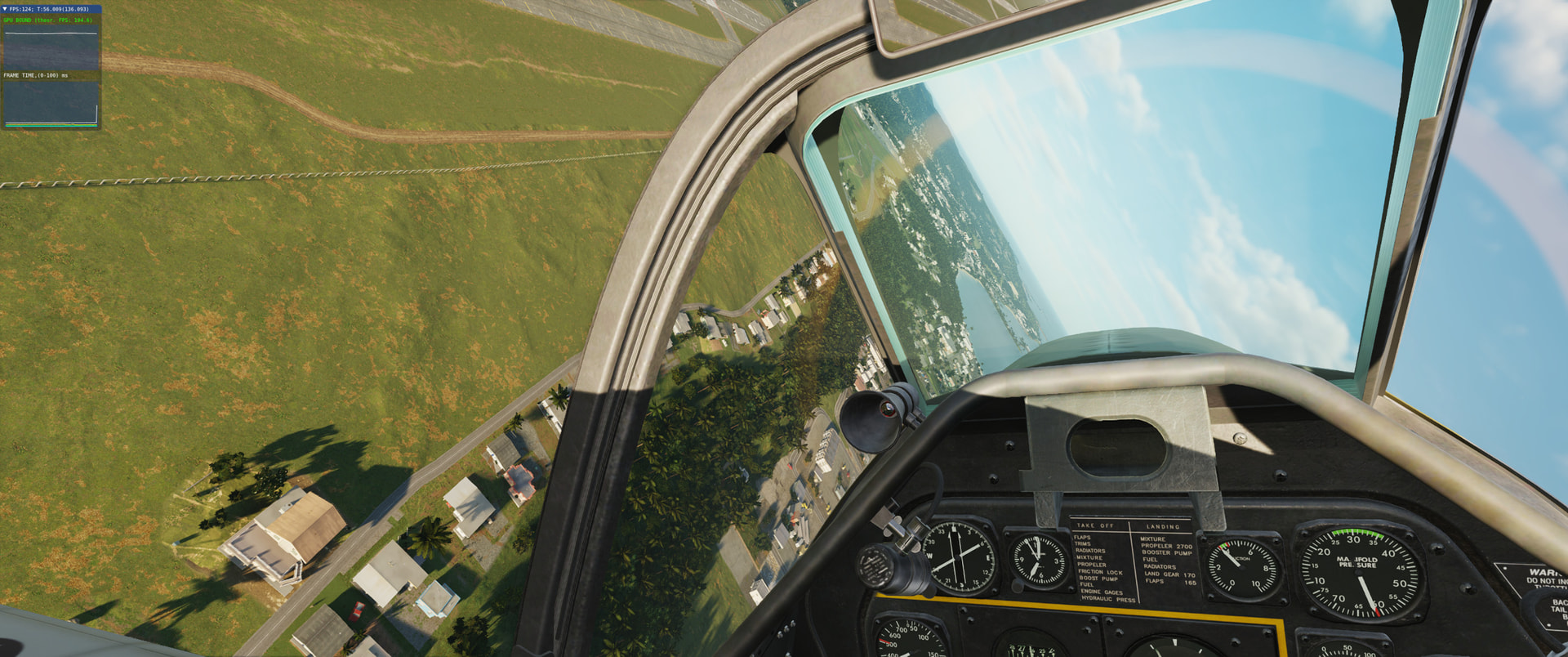
I used this P-51 / Marianas benchmark mission track: HERE
On LOW button settings FPS 300 99% of the time. Got an occasional dip down toward 230 for maybe one or two seconds overflying the airfield.
On MED button settings FPS 300 probably 95% of the time. Low of 229 for just a brief second.
On HIGH button settings FPS 190 with an occasional dip to 160.
Manually sliding all of the sliders to the right, including cockpit displays 1024 every frame etc…I was getting 130 initially then sort of oscillating 150-180.
Finally..bumped the resolution to 3440 x 1440 and kept all the sliders to the right..was getting steady 140 FPS and occasional dips down to 100 FPS.
All of these tests were in 2D…I’ll get back with some VR numbers later.
I also ran the F-5 and AH-64 missions you had and was getting 300 fps on both on those initial settings.
Been using it for a few years. I know for sure 2 things:
It gets rid of MSFT stuff I don’t want: Onedrive, Copilot for starters. There are others.
It cuts the number of process running from 160+ to 96.
There are other tools now. I noticed someone reviewing a GUI app that seems to use the exact same options (things to disable/uninstall), down to the same exact help info on each. They are likely just running CTT De–bloater behind the scenes. FWIW.
Found one example:
Jay’s 2 cents had something similar.
Thing is, on this beast of a PC I may not notice the stutters so much anymore?; the 2010 PC I did notice things were smoother, ie; fewer hiccups. That’s when I first started using it (on that rig).
Related (IMO): My lil Lil Project addon (my “Medium” button system settings, 1080P) was rock solid: I load a bunch of scripts up at the start and on the 5900X box the graph would ‘jump’ (down, so bad); the Bread Truck (fire truck, and others) that crawl around your start location (for ‘effect’) would stutter in this first 30 seconds - not even a little twitch with the 9800x3d.
NOTE: the above could very well be the smokin fast M.2 drive i put in. Advertised 14,000+ MB/S (or some metric that escapes me now) vs 3,000+ on the M.2 EVO 960 (old machine)
…ok, it’s one of these:
NVMe PCIe 5.0 PCIe 5.0 x4 bus Read: ~10,000 – 14,900 MB/s write:~8,000 – 14,000 MB/s
So far.
By ‘initial settings’ you mean the ‘Medium’ button, or yours, 1080P?
IMO it will take a 15800x3d and a nVidia 9090 to run DCS with max sliders in VR. But of course they will add more fluff so, well, it probably wont 
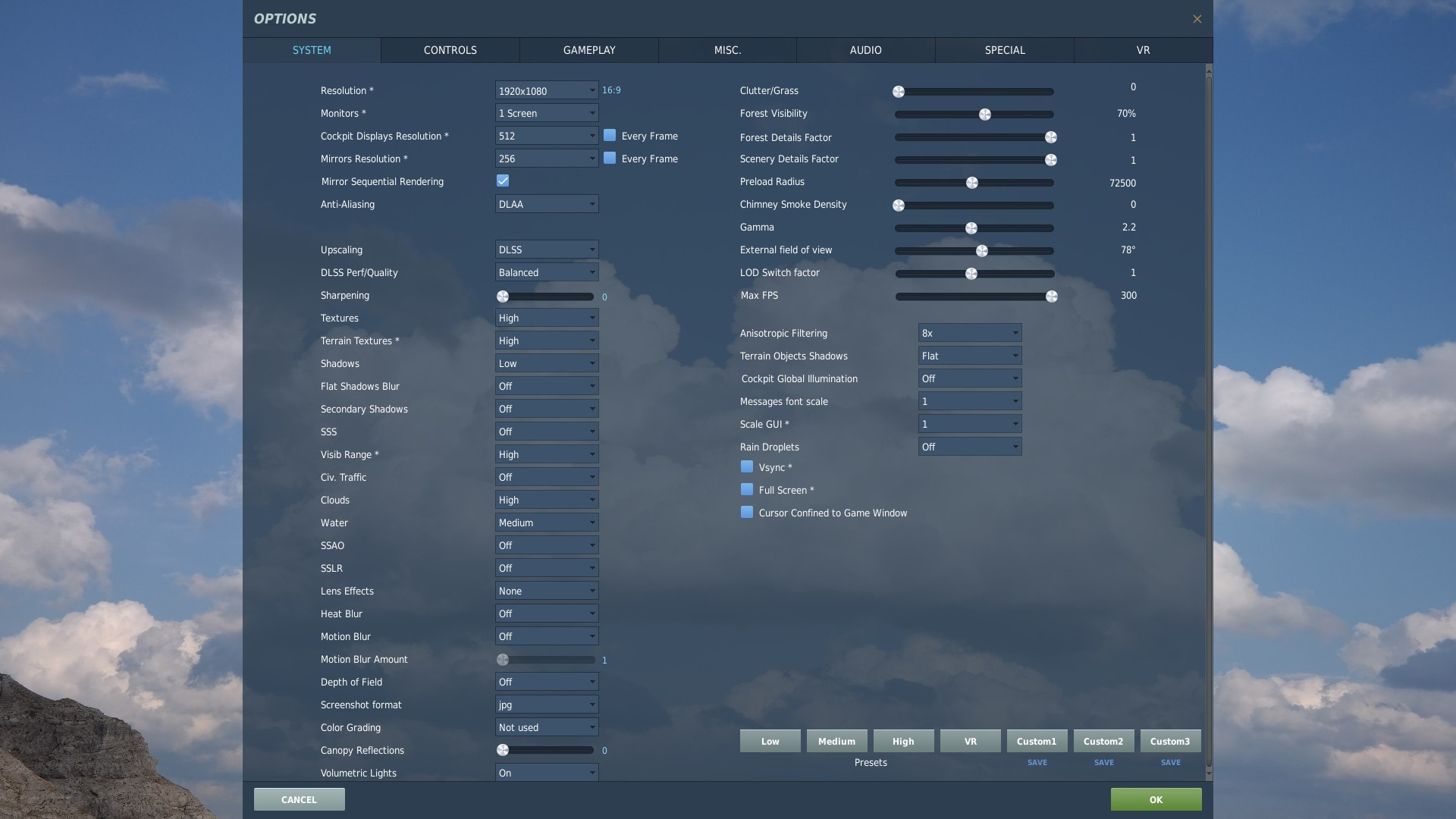
Interesting. I ran the TF-51 bench. I only have a 1080P monitor on this rig. I only use it for VR so this is more like a ‘terminal’ if you will. With that..
According to nVidia overlay
High Button then slide all the significant bits to the right:
FPS 120-150.
The CPU utilization was never above 67%, GPU was at 95%. GPU Temperature highest was 52C. For longevity I like that.
Low Button
FPS 295 steady mostly but dips to 240 over the airbase.
CPU 45%., GPU 93%. Temperature 45-47C
My Setting: Medium button +
Now I know why I never fly the Marianas map. The Hornet, Syria with my settings above, is a pretty solid 295 FPS vs 1/2 that in Marianas via the benchmark track.
FWIW the benchmark track with my personal settings is 220+ pretty steady vs 120-150 with everything cranked as in above. I wont know more til I get VR going…still moving stuff from the old box.
A chance to tame the cable madness too:

VR + Moza AB6 + Throttle
Got VR working. My initial feels…
It’s not a magic bullet in DCS. Not that I really and for truly expected it to be. Just was kinda hoping???
MAX FPS set to: 90 (my Varjo Aero headset rate)
For me SMOOTH motion is key
Dropped down down through a hole and circled low around Kabul.
Results: stayed pegged on 90 the majority of time. Flying along at 500 feet AGL and 500+ knots and looking at 3/9 O’clock showed very little if any ‘chunking’ of objects as they go by; the relative movement high in this case but it looked good.
MOZA AB6
Me like. Only tried the Viper in DCS. No MOZA Cockpit settings used, just what DCS gave me. Loved it! Keep in mind I have only acquired about 30 minutes (over 3 flights, mostly straight and level and flying close formation) of controlling a Viper but this gave me that same feel as best I can recall.
Though the last flight was 25 years ago I still recall the immediate ‘ah ah’ moment when I ‘melded’ with the machine, “hey this stick doesn’t move [much]”. Took like 30 seconds for my brain to adjust. Hard to explain.
Off to test other stuff - and rebuild all of my module input settings. Ugh.
@BeachAV8R My Varjo Aero is starting to annoy me. Understand you have a new Quest 3. What-cha think so far? Pimax still worries me.
Frame rate of the gods.
If you’re still with me…
Something was gnawing at me in VR performance-wise. Made another pass through the BIOS and I may have set the wrong memory boost switch. Changed it and so far seems to have made a notable difference.
On my Mobo MSI 870P, via the Quick menu, it needed to be set to AXMP1, not EXPOn. We will see.
Oh, and @BeachAV8R me and the Varjo Aero are getting along better. Wasn’t wearing it quite like it wanted. Fixed that and a really sharp image now.
Could you develop that please? I am OK with my Aero but just to be sure I am not missing sth important. Thanks!
I wasn’t using the…what I’ll call ‘temple’ knobs - between your ears and temples. They rotate to tighten and seem to get the headset/lenses closer and/or more aligned with my funky shaped head. While it is snug it is less uncomfortable over time then before. A simple case of not RTFM in my case.
I’m seeing less of the frame of the interior of the lens structure too.,
I’ll post up some VR results soon. Real Work™ been keeping me away from home a lot.
Okay. Some new observations:
_________________________
MOZA AB6
I’m loving this thing. Took a bit to work out the settings (“I’m not a smart man, Jenny”) but I’m loving it, especially in the Viper and Phantom. And, I finally groked the settings for the Apache. Less of this:
Now, don’t ask me to explain it off the top of my head but, the basics are:
I ended up using the DCS Apache preset but made sure these basics where set:
Centering spring force: 0
Maxed out the friction force as this seemed to keep the stick in place when releasing the trimmer button. To paraphrase ‘Casmo’ , “there’s always going to be some ‘slack’ in the system…”.
This bit (time-stamped) was helpful
Once the FFB is in the ballpark (I haven’t used FFB in like 20+ years) the ‘timing’ of it feels like;
Oh, and using the hardware trim makes the Phantom easy to fly now too. Feeling the stick move with the trim hat - and remain there - is the ticket.
_________________
New system in VR
Somehow I got things about right. With multiple cloud layers (Overcast, bases ~7,000 ft?) I can ‘rage’ around Bagram and Kabul at 500+ knots & 500 ft, doing hard turns; zooming up in a loop then pointing the nose straight down at the center of Kabul, doing aileron rolls til I have to pull out - and it stays at 90FPS (max FPS setting too). 95% of the time. It’s a rush. Before it would be choppy, now it just makes me dizzy.
________________
Getting the Varo Aero & DCS to play nice took some trial and error. It always worked but I had the feeling something was ‘off’.
I was confused too about the DCS VR Settings: Use Eye tracking and use Quad views. Hard to find an answer on this (re; Vargo Aero) but it seems like if your headset does these things then you do NOT need to check them in VR. At least with the Aero. Unchecking them is when I saw noticable improvement. Nothing crazy but it stayed locked on 90 FPS a lot more.
I did change my fan curves (fans and water pump) to start maxing out at 45C; can do normal stuff and it remains ‘calm’. When things start to stress it it gets a bit noisy, but not terrible. I don’t notice it with headphones.
Heat is the enemy.
Almost forgot…the above wasn’t with just me and nothing else. I had all my scripts running too. Audio going; agencies up and running; etc. didn’t look at the debug output but this mission had ~1,000 potential groups being ‘sorted’ and dozens active, and moving about
Nearly collided with a Strike Eagle overflying Kabul 
Now to test the 4090’s legs. Oddly enough I’ve seen instances when MORE ‘stuff’ runs faster.
Moza has really worked hard on the Cockpit software, which was really a mess 6 mos ago. It’s coming along nicely. I should say the same about WingWing SimAppPro. Both companies have shown that they plan on continued refinement of their products.
Good to hear. I’m a little leery about all the inner workings and hidden movements with FFB bases; how long will it last and such.
Learning to embrace consistency
So, I’ll stop bothering yawl after this but, for grins I bumped a couple of things up slightly. In VR, even the Aero (very clear once you have it on correctly), not sure it would be worth it slamming everything to the right.
The big thing I did try outta curiosity was drop the FPS MAX to 80. At 90 it would drop down to 83-88-ish here and there and it was noticeable. The odd low-70’s too. At 80 it never budged. Never.
While 80 saw some ‘jumping’ it was minor, and only apparent at my 3/9 line (+/- 1). At 500 feet and 500-550 knots it was there but, well, I was looking for it.
The temperature alarm didn’t go off either (at MAX FPS 90+ it peaked at 83C). They say that’s ok but I need this thing to last. And work in the summer. Or immerse it in a bucket of Isopropyl alcohol. What could go wrong?
If you’re a hardware guru this is I’m sure well known. I am not. I’ve always thought I needed at least 90, solid, no matter what.