Were I to own a 2080ti right now, I’d wait till at least the 30x0 refresh happens.
Then you can sell me your 2080 super duper cheap!! Yay!! Mates rates!! 
We think alike; I’m stalking a completely new system to replace my now 3 yo one. Going BIG again. Probably. Just gets harder to rationalize spend that amount 
This is probably what we will all be buying after we get our new cards and may well be the solution you need
https://www.amazon.co.uk/dp/B08CDDF5CS/ref=cm_sw_r_cp_awdb_imm_t1_iBfVFb6CX4YHE?_encoding=UTF8&psc=1
1 Like
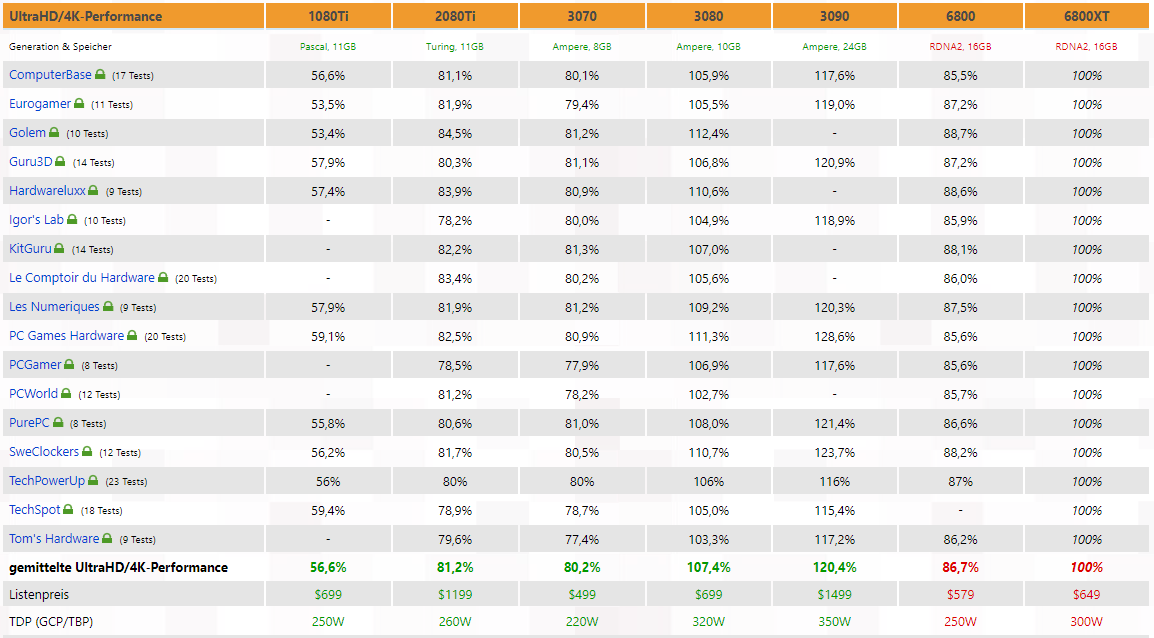
Average of just over 5%. 6gb less vram. What’s the price comparison?
Yeah…good point. If you are paying 30% more for 5% more gain…(made up numbers by me of course)…then you have to start crunching whether it is worth it or not. I’ve never gotten too in the weeds with those numbers though. In the same way I rarely pull up FPS numbers in P3D or DCS…I just sort of wag what feels right. Probably not the most legitimate way to assess things… 
Bottom two lines post the prices and wattage. I mean, they’re pretty neck and neck at this point. 3080 is $50 bucks more in the ideal world LOL!
Missed that.
Honestly for simming the extra vram probably makes a bigger difference (at least in xplane) than the 5% performance gain. I’m pushing the limit with 8gb on modest settings with my 1080. It only goes up…
Agree: using fpsVR (tells you the VRam in use), I saw a consistent performance diff when I stayed below 7+ gb on my 8gb 1080. Reducing textures and such in the Syria map was necessary if I recall. In VR, with the 1080, I don’t notice any significant texture quality.
Check this out … my 10GB 3080 running FS2020 with the KJFK landing challenge in the A320 … 4K … Ultra preset …
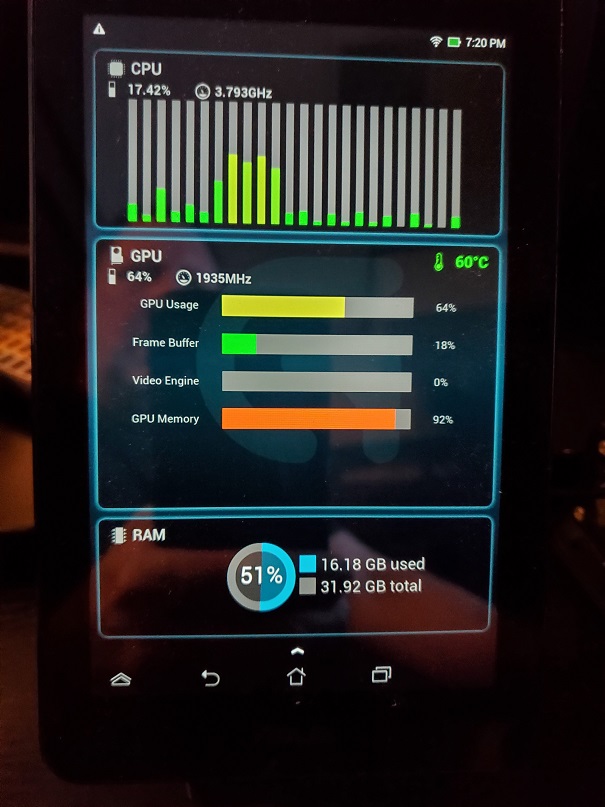
FS2020 is only giving me about 33fps at this point which is why I use the High-End preset which will put my VRAM usage into the 80%'s.
VRAM usage hasn’t really concerned me up to this point. It’s all voodoo to me man … maybe Nvidia actually knew what they were doing when they only put 10GB into these cards.
Sounds like top shelf thinking…
Not picking on this guy but the results are in kind with others:
DCS World - RTX 2080Ti vs RTX 3080
When he’s near the island on the SuperCarrier there’s really no difference - where you need it the most!
The sim [engine] needs work is a common, increasingly it seems, theme I hear. Away from the carrier it’s about 25-30%. A cockpit view would knock that all down a few notches too.
The above isn’t in VR I believe either, so cut it all in half (based on my tests 2D hi-res vs O+).
He’s got a better rig than I do (GPU for sure, memory and possibly CPU) yet the numbers don’t seem significant enough, yet.
I would just point out nothing ever uses 100% of RAM, not VRAM or PC RAM.
When it gets close, the programs and/or Windows will swap stuff out to leave a small amount of free space for temporary changes. Now if you were using only 80%, I would say yes, you had more than you needed, but 92%?
That says to me “it would use more if it was available but it’s not so instead it’s swapping out”.
Someone needs to do a test with a card with 16GB using those same settings and that same monitor software to see what it reads. If you see a 16GB card is using 80%, then you have your proof. If it says it’s only using 57%, that means that 9GB was all it needed, but I doubt it.
Clearly you have never run any of my code.
What you say is true if such dynamic caching and memory management is implemented. For a lot of game engines that is indeed so, but it is not a given. There is nothing keeping you from requesting as much RAM as you like from within a process. Once you run out of space inside the actual RAM, the system will begin swapping (it will do it way before that depending on how smart it is). Once the swap is full, it starts depending on how gracefully your OS is able to handle OOM events. It can reach from a daemon starting to kill off processes in reverse order of how critical they are (usually browser tabs go first) to the entire system grinding to a halt. Same goes for VRAM. You can easily crash a process just by requesting more VRAM than is physically available.
@B12 how is the 3090 performing?
Waaaayy back (think pre-DirectX - and even then) it seemed standard - necessary even - to roll your own memory manager (it was a challenge); grab a large chunk (most of it even) then divvy it up as you saw fit. Plan was to never need to go back to the trough. No clue what they do now.
I’ve seen VRAM usage go to 99% (never 100%) in other titles plenty of times on my 1080ti. That’s beside the point though and I totally agree with you. I have a sneaking suspicion that the lack of VRAM (10 measly GB) is creating some sort of swapping algorithm bottleneck since GPU and CPU usage is so low and it’s only churning out 33fps.
I’d love for @B12 to set up the same KJFK landing challenge in the A320 … 4K … Ultra preset … scenario and give us his findings (framerate, VRAM usage, GPU usage and CPU usage) with his 3090. I don’t think anyone has a 20GB 3080 yet by any chance?
EDIT: I just watched a video of a guy running 4K max settings over New York and his VRAM usage was about 17.5GB LOL! If you’ve got it, MSFS2020 will use it! His GPU usage was at 99%! Not sure what kind of graphics card the guy has though but I don’t think it was that great as his framerate was really low.
2ND EDIT: Wow, I went down a rabbit hole of checking how MSFS2020 swaps out VRAM. It doesn’t use the Windows 10 “Shared GPU memory” at all …
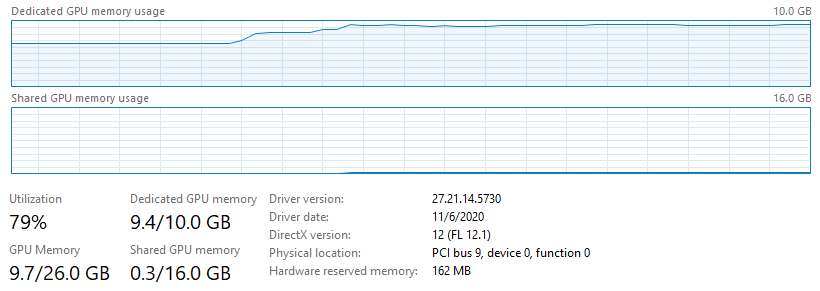
It has to be using some sort of proprietary system RAM method.
Anyway, one good thing that came out of my investigation is that I found out my system RAM was only running at 2400 MHz for who knows how long LOL! Got ‘er back up to 3466 MHz and she’s running that landing scenario I mentioned above at around 40 FPS.
Don’t even try to make sense of MSFS2020 … at one point I changed my settings to LOW-END … didn’t make much of a difference. Also changed it from 4K to 1080p … not much of a difference. I have a headache.
If I dont buy a 3080Ti I might just wait till the 4080 comes around. Maybe it will not be as silly a launch as this. I will get a 45 percent boost from my 2080Ti to a 4080Ti not the 25 to 30 percent I expect from a 3080… Why? Cos my 1080 non Ti is still kicking butt after years of faithful service.
Had similar thinking here. However my secret, backup, plan-B, to stretch my current stalwart (also a 1080), was for the 2080Ti’s to come down in price when all those 30xx hit the market. So much for plans.